Reel guide
G63 and five bridges
The background changes on every beat.
- Mode
- Genjutsu Lite → Motion Transfer (720p)
- What it cost me
- 16 credits × 5 = 80 · one 8-second generation
How it works
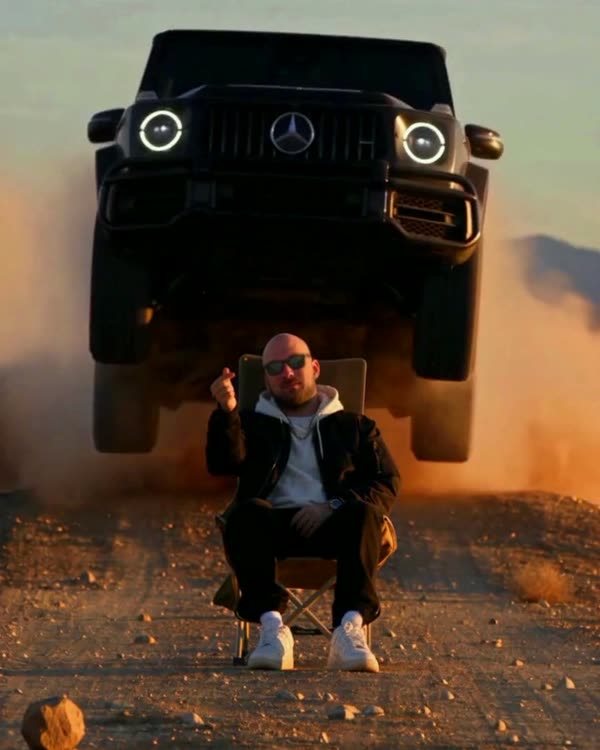
The car crosses a bridge in one pass while the world around it changes to the music: sunset, the snowy Alps, cherry blossom, Moscow City at night, a thunderstorm. The trick: it's not one generation but five, all on the same source. The car moves the same way in each of them, so the cuts don't show.
What you'll need
No Claude, no code, no programming: everything happens in the apps.
Step by step
Done: 0 of 5
Step 1. Source
Where: Instagram
Find the trending reel you want to recreate and download it (any reel downloader or a screen recording). This is the “skeleton”: the AI takes the camera movement, the timing and the car's path from it.
Step 2. Car sheet
Where: Gemini
Open Gemini → upload 2–5 photos of your car (or find photos of the model you want) → paste the prompt:
Gemini prompt · car sheetVehicle reference sheet: one single real [black Mercedes-AMG G63] (the same car as in the attached photos), shown four times in a clean 2x2 grid on a seamless neutral light-grey studio background with soft even studio light and soft floor shadows. Top left: front three-quarter view. Top right: rear three-quarter view. Bottom left: exact side profile. Bottom right: straight rear view. The whole car visible in every panel, the same car, identical proportions and details. Blank licence plates with no characters, no text, no labels, no people. Make the car look like a real, regularly driven car photographed with a real camera, not a clean 3D render: a very thin film of fine dust that softens the reflections, faint swirl marks, a little brake dust on the wheels.
Your car goes in the square brackets. Check the sheet by eye: headlights, grille, wheels, bumper colour. A mistake in the sheet = a mistake in every frame of the video.
Step 3. Generation
Where: Higgsfield
In Higgsfield choose Genjutsu Lite → Motion Transfer → upload the source as the video and the sheet as the image → paste the prompt → run. Check the price in credits before you run it. It takes 5–10 minutes.
The prompt is the same for all five generations; only the Environment line changes.
Prompt · one for all five generationsORIGINAL VIDEO: @[Video 1](video_1) VEHICLE REFERENCE: @[Image 1](image_1) Use the attached original video as the exact timing, camera and motion reference. Replace the original car throughout the entire video with the exact car from the vehicle reference: [a black Mercedes-AMG G63, boxy body, vertical slat grille with the star, round LED headlights with illuminated rings, exposed door hinges, black multi-spoke wheels], blank licence plates without characters, closed roof, dark tinted windows with the driver barely visible. The car drives exactly the same path at the same speed, in the same position and size in the frame, wheels rotating naturally, as the original car. Keep the same tracking camera at the same height and distance, the same lens and the same framing, and the same dark asphalt road with two double yellow centre lines and a metal guardrail on the bridge. Environment: [ВСТАВЬ ОДНУ СТРОКУ ИЗ СПИСКА НИЖЕ] One car only. No people outside the car, no other vehicles, no signs, no readable text, no logos except the Mercedes star. This must look like real footage from a real cinema camera, not a 3D render and not AI: gloss paint with true reflections of the surroundings, natural motion blur on the wheels and road, subtle sensor grain, true-to-life colour, no HDR glow, no over-sharpening, no CGI shading.
Five Environment lines:
Environment 1 · Sunset over the seaa long bridge over a calm sea at golden hour, the low warm sun near the horizon, soft orange and peach sky with thin clouds, warm rim light on the car body.
Environment 2 · Snowy Alpsa mountain road bridge in the snowy Alps on an overcast winter day, snow-covered slopes with dark fir forest, snowbanks along the guardrail, wet dark asphalt, cold soft white light, light mist around the peaks.
Environment 3 · Cherry blossoma bridge lined with blooming pink cherry blossom trees on both sides, petals drifting in the air, soft spring morning light with gentle haze, hills in the background.
Environment 4 · Moscow City at nightMoscow at night, a wide bridge over the Moscow river, behind the car the Moscow City skyline: the Federation Tower with its sharp spire, the twisted Evolution Tower, the bronze-gold Mercury City Tower, all windows lit, red aviation lights, the skyline mirrored in the black water. Real Moscow, not a generic city.
Environment 5 · Thunderstorma bridge across open flat land under a dramatic purple-grey thunderstorm, heavy dark clouds, a bright lightning bolt striking in the distance.
Vertical without black bars. Extend the source at the top and bottom with stretched edges of the frame (sky on top, road below) and add one more paragraph to the prompt after the Environment line. The brackets hold what's above the car — match it to your landscape:
Paragraph for vertical · after EnvironmentVertical 9:16 format: the whole tall frame is one continuous real shot from top to bottom, with no black bars, no borders, no blur and no split screen. The car stays exactly where it is in the reference, in the middle band of the frame at the same size; above it [a tall open sky and the mountain landscape] fill the upper part of the frame, below it the road with the yellow double lines continues to the bottom edge of the frame.
Step 4. Check
Where: Higgsfield
Scrub through the result frame by frame: the car is there, no extra people, no text, no black frames. Defects usually sit in the first and last seconds — just trim them.
Step 5. Edit
Where: CapCut
Editing in CapCut
- Stack the five results on top of each other and align them on the first frame.
- Cut on the beats of the music: on each beat switch to another layer.
- Don't shift the timing — take the frame from the same second. Then the car stays put at the cut and only the world around it changes.
CapCut: trim, add text, the original sound or your own track. Format 9:16.
Where it breaks
- “night city” without named towers comes out as a faceless megacity. Name specific buildings;
- if the source has black bars at the top and bottom, cut out the picture band, generate on it and put the bars back in the edit.
A caption that gets comments
“Only ONE of these bridges is real 👀 Which one? Drop the number”.
Follow — a new trend almost every week
Open Instagram